November 17, 2026
Will it simulate? Introducing Physicl Checker
Drop a USD file and Checker scores it out of 24, runs it in NVIDIA Isaac Sim, and names every prim you need to fix.
Drop a USD file and Checker scores it out of 24, runs it in NVIDIA Isaac Sim, and names every prim you need to fix.

Physicl Checker is open today. We built it to test the 100,000+ assets in our own library, and now anyone can run it on their own USD files.
Robot policies learn physics from the objects they train on. If an asset looks right but carries the wrong mass, friction or collision setup, the robot learns the wrong world.
Most validation only checks the file itself: whether the USD is well formed and follows the spec. It won't tell you whether a cup settles, when a bowl starts to slip, or whether a lid swings all the way open once physics is on.
Before a sim-ready asset goes into our library, we load it in NVIDIA Isaac Sim and run 15 physics scenarios on it. We drop it, slide it down slopes from 15 to 60 degrees, tilt a platform under it until it slips, spin it on every axis, and drive every hinge, drawer, door and lid through its full range.
We log every frame and run more than 20 automated checks on it, comparing what the asset does with what its USD file says it should do: how it falls, how much it grips, where its joints stop. Everything is measured from the simulation data, so the result doesn't depend on how the asset is rendered.
That's how we catch problems a file check never sees, like an asset spinning at over 600 degrees per second in free fall, or sinking into the floor when it lands.
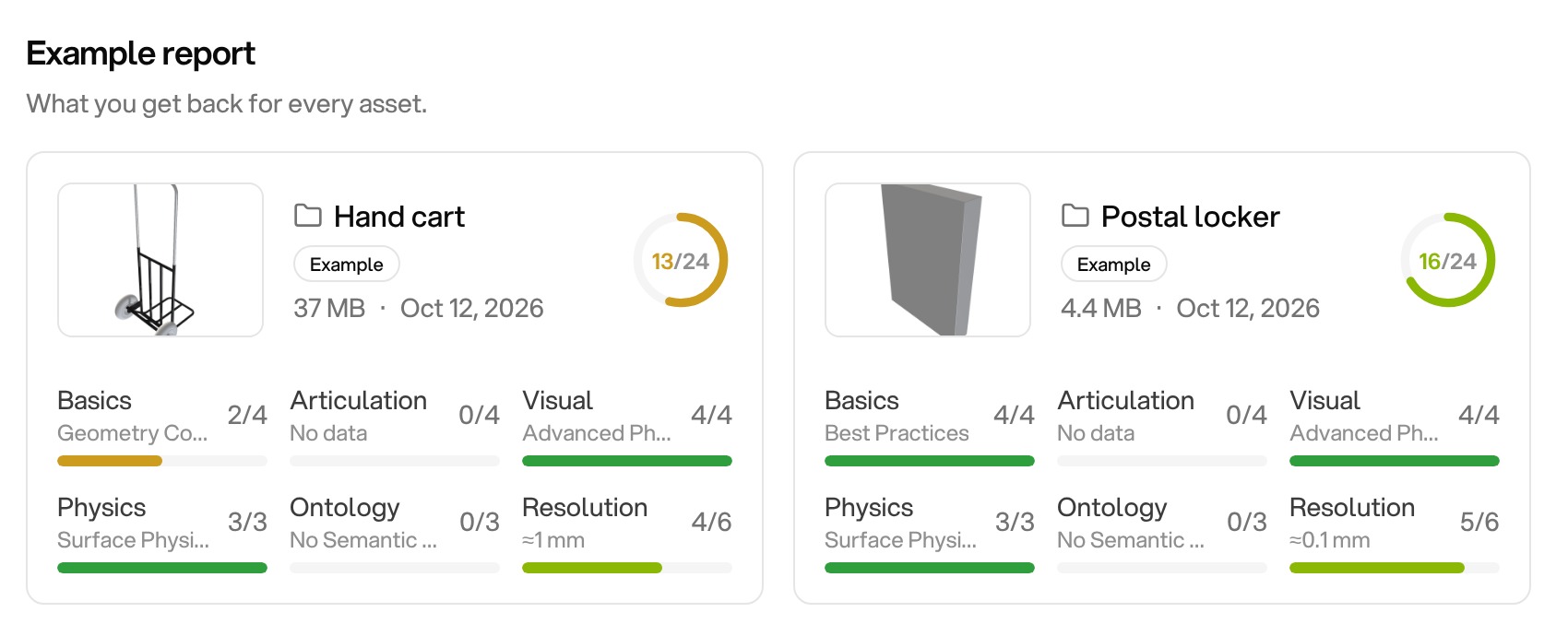
Checker gives you the same kind of report on your own files. Drop a USD file or a folder and you get a score out of 24, a run in Isaac Sim, and the list of prims to fix.
| Section | Points |
|---|---|
| Basics | 0 to 4 |
| Articulation | 0 to 4 |
| Visual | 0 to 4 |
| Physics | 0 to 3 |
| Ontology | 0 to 3 |
| Resolution | 0 to 6 |
| Overall | 0 to 24 |
Each section is scored on its weakest part, so one unlabeled part or one low-detail mesh pulls the whole section down. The same asset always gets the same score.
A score of 16 or more is a strong baseline for production. Between 8 and 15, start with the sections Checker flags.
The same library powers Studio, where researchers generate images and video with exact ground truth on every frame.
Checker is live at physiclcheck.physicl.ai. Run it on your own files and tell us what it misses.